Exposing Kubernetes: Dual HAProxy Setup on Proxmox & Ingress Controller
(64GB RAM Kubernetes Cluster for €39/month — Part 5)

This is Part 5 of a multi-part series on building a Kubernetes homelab / staging environment with Proxmox on a Hetzner EX44 (14c/20t, 64 GB RAM) dedicated server.
In Part 4 the cluster was deployed successfully and runs entirely behind NAT. That’s a nice security property, but it also means there is no natural way for external clients to reach the services inside the cluster.
In cloud environments this problem is usually solved by a managed load balancer. In a self-hosted Proxmox setup we need an equivalent component that sits on the boundary between the public network and the private cluster network.
Here, HAProxy plays that role.
It runs on the Proxmox host (not inside Kubernetes), accepts incoming connections on the public IP, and forwards traffic to the appropriate nodes behind NAT.
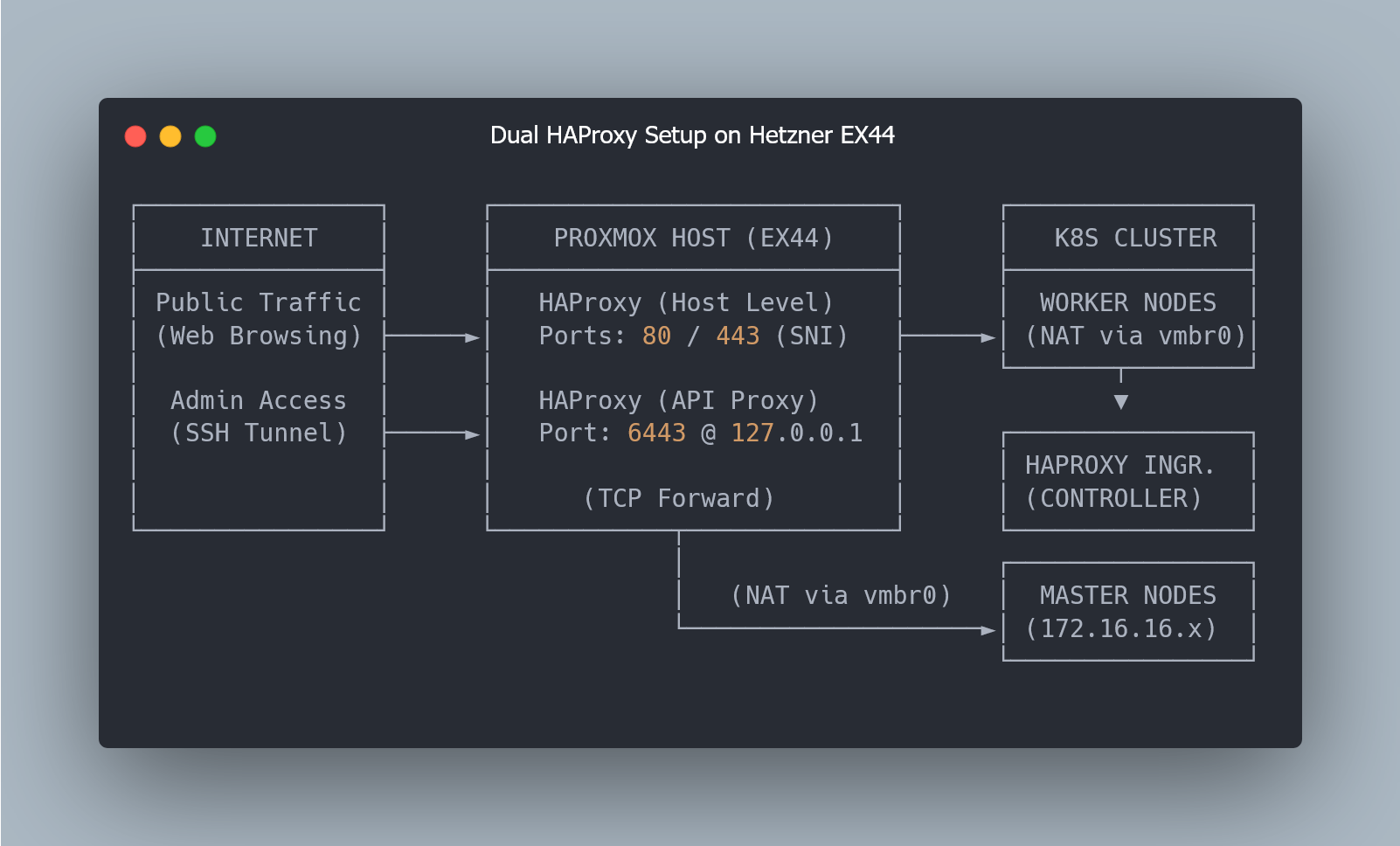
Why Use HAProxy as a Proxmox Edge Gateway?
A few practical reasons make this placement hard to beat:
Single entry point. The host has the public IP; the nodes don’t. External traffic has to land on the host anyway.
Load distribution. Incoming connections can be spread across multiple worker nodes instead of depending on a single node.
Filtering at the boundary. It’s convenient to reject unwanted domains or traffic before it even enters the cluster.
TLS passthrough. HAProxy can make routing decisions based on SNI without terminating TLS, keeping certificates and encryption fully managed inside the cluster.
Infrastructure Architecture: From Public IP to K8s Ingress
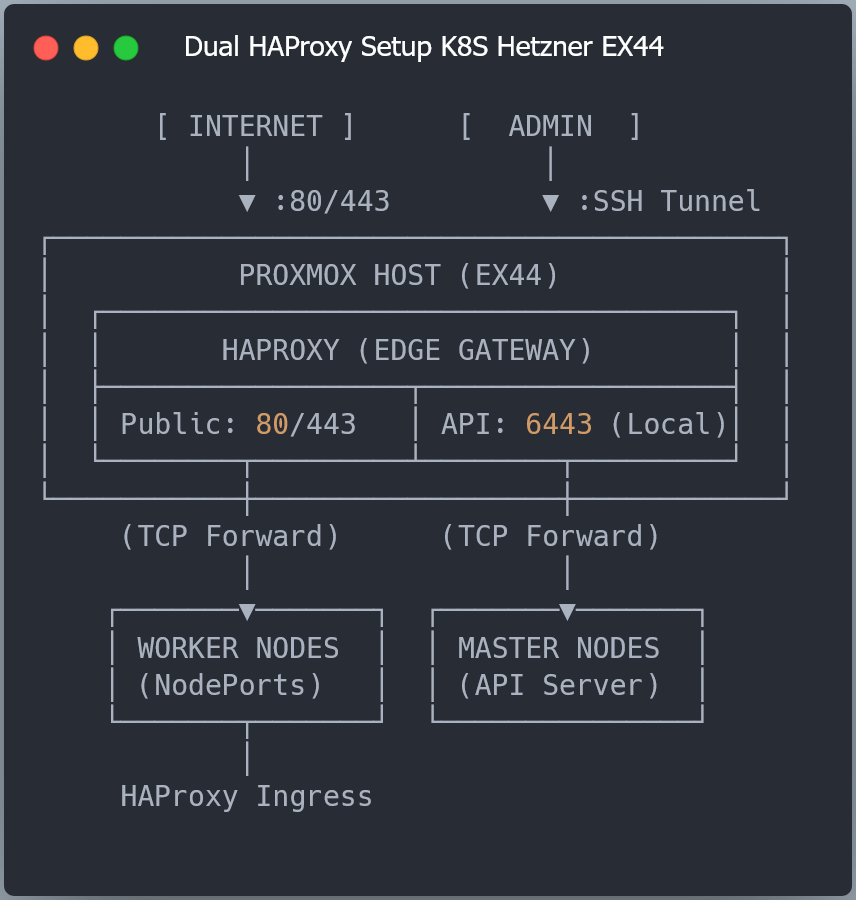
As shown in the diagram above, we use an HAProxy instance running directly on the Proxmox host as the entry point for all external traffic.
Requests on ports 80 and 443 are forwarded to NodePort services on the worker nodes (30080 and 30443), which route traffic to the HAProxy Ingress Controller Pods running as a DaemonSet. The ingress controller then applies routing rules and forwards requests to services inside the cluster.
Traffic on port 6443 is routed internally to the control plane nodes and accessed via SSH port forwarding, keeping the Kubernetes API private.
Automating HAProxy Config with Terraform Templates
In Part 3, Terraform already created the VMs and assigned internal IPs to every control plane and worker node. That means Terraform already has everything needed to build an HAProxy config — and we don’t have to maintain it by hand.
As the cluster evolves - nodes added, removed, or rebuilt - HAProxy configuration will stay in sync.
All that we need to do is add the following snippet in terraform/main.tf:
resource "local_file" "haproxy_config" {
  depends_on = [
    proxmox_virtual_environment_vm.control_planes,
    proxmox_virtual_environment_vm.workers
  ]

  filename = "${path.module}/../ansible/playbooks/roles/haproxy/files/haproxy.cfg"

  content = templatefile("${path.module}/templates/haproxy.cfg.tftpl", {
    control_planes = local.control_planes
    workers        = local.workers
  })
}
This does three simple things:
waits until all VMs exist (so we have real IPs),
renders the HAProxy config from a Terraform template,
writes it straight into the Ansible role directory, ready for deployment.
Deep Dive: HAProxy Configuration for K8s API and Traffic
The HAProxy configuration consists of three logical parts:
Kubernetes API load balancing
HTTP traffic forwarding
HTTPS traffic forwarding with SSL passthrough
Each serves a distinct role.
Kubernetes API Load Balancing
frontend kube_api_frontend
    bind 127.0.0.1:6443
    mode tcp
    default_backend kube_api_backend

backend kube_api_backend
    mode tcp
    balance leastconn
    option tcp-check
%{ for control_plane in control_planes ~}
    server ${control_plane.name} ${control_plane.ip}:6443 check
%{ endfor ~}
A few notes about the choices here:
bind 127.0.0.1:6443keeps the API endpoint local to the host. It remains reachable via SSH port forwarding, but is not exposed to the Internet.leastconnis a reasonable default for long-lived connections; it avoids piling traffic on a node that already holds more active sessions.The backend list is generated from Terraform, so it tracks the actual control plane IPs.
HTTP frontend (port 80): ACME + redirect
Port 80 exists mostly for two reasons:
cert-manager HTTP-01 challenges (
/.well-known/acme-challenge/)redirect everything else to HTTPS
frontend worker_http_frontend
    bind 0.0.0.0:80
    mode http
    option httplog
    # Don't log null connections
    option dontlognull

    # Block httpoxy attacks; prevents redirecting internal server traffic to an attacker
    http-request del-header Proxy

    # Forward real client IP to backend (for logging and access control in cluster)
    option forwardfor
    http-request set-header X-Real-IP %[src]
    http-request set-header X-Forwarded-Proto http

    # Step 1: Domain filtering - check if domain is in allowed list
    # Read allowed domains from file (exact matches)
    acl allowed_domain_exact hdr(host) -f /etc/haproxy/allow_domains.txt

    # Wildcard domain matching (e.g., *.example.com)
    # This matches domains ending with patterns from the file
    # Note: For wildcards like *.example.com, the file should contain .example.com
    # HAProxy will match any subdomain ending with .example.com
    acl allowed_domain_wildcard hdr_end(host) -f /etc/haproxy/allow_domains.txt

    # Step 2: Check if request is for Let's Encrypt HTTP-01 challenge
    # Let's Encrypt uses /.well-known/acme-challenge/ path for validation
    acl is_letsencrypt_challenge path_beg /.well-known/acme-challenge/

    # Rule 1: Block requests from domains NOT in allowed list
    # This must be checked first - reject unauthorized domains immediately
    # Domain is allowed if it matches exactly OR matches wildcard pattern
    http-request deny if !allowed_domain_exact !allowed_domain_wildcard

    # Rule 2: Redirect allowed to HTTPS (if not ACME)
    http-request redirect scheme https code 301 if !is_letsencrypt_challenge

    # Rule 3: Route ACME challenge
    use_backend worker_http_backend if is_letsencrypt_challenge

    # Default backend (should not be reached, but kept for safety)
    default_backend worker_http_backend
Additionally, a few baseline HTTP protections were added:
Requests with unknown or unauthorized
Hostheaders are dropped using a strict allowlist (allow_domains.txt)The
Proxyheader is stripped to prevent httpoxy-style header injection attacksThe real client IP is preserved via
X-Real-IPandX-Forwarded-For, so services inside the cluster see the actual source addressACME challenge paths (
/.well-known/acme-challenge/) are allowed over HTTP, while everything else is redirected to HTTPSOnly explicitly allowed domains are served, reducing noise from internet-wide scans and random traffic hitting the server IP
This setup blocks unknown domains and reduces random scan noise, but it’s only baseline hardening. A proper edge layer like Cloudflare is still needed to handle DDoS traffic, bot filtering, and TLS termination reliably.
HTTPS frontend (port 443): TLS passthrough with SNI filtering
For HTTPS traffic, TLS stays end-to-end. HAProxy does not terminate TLS — it simply forwards TCP connections, while cert-manager and the ingress controller handle certificates and encryption inside the cluster.
frontend worker_https_frontend
    bind 0.0.0.0:443
    mode tcp
    option tcplog

    # Wait for SNI extraction from TLS handshake
    tcp-request inspect-delay 5s

    # Domain filtering via SNI
    acl allowed_domain_exact req_ssl_sni -f /etc/haproxy/allow_domains.txt
    acl allowed_domain_wildcard req_ssl_sni -m end -f /etc/haproxy/allow_domains.txt

    # Reject unauthorized domains
    tcp-request content reject if !{ req_ssl_sni -m found } || !allowed_domain_exact !allowed_domain_wildcard

    default_backend worker_https_backend
The key piece here is tcp-request inspect-delay. It gives HAProxy a short window to inspect the initial TLS handshake and extract the SNI before deciding where to route the connection. In practice, the SNI arrives immediately — the 5s value is just an upper bound, not an actual delay.
Connections without SNI, or targeting domains not present in the allowlist, are dropped at the edge. This ensures HAProxy only forwards traffic for explicitly allowed domains and ignores everything else hitting the server IP.
Worker backends (NodePorts)
The following backend configuration uses Terraform loops to dynamically map all worker nodes to the specific NodePorts used by the Ingress Controller:
backend worker_http_backend
    mode http
    balance leastconn
    option tcp-check
%{ for worker in workers ~}
    server ${worker.name} ${worker.ip}:30080 check
%{ endfor ~}

backend worker_https_backend
    mode tcp
    balance leastconn
%{ for worker in workers ~}
    server ${worker.name} ${worker.ip}:30443
%{ endfor ~}
This setup assumes an ingress controller exposed via NodePort:
HTTP NodePort:
30080HTTPS NodePort:
30443
HAProxy forwards traffic to those ports on the worker nodes, and Kubernetes handles the rest inside the cluster.
Client IP Preservation: PROXY Protocol vs SNI Passthrough
Since HAProxy sits in front of the cluster, worker nodes will see HAProxy’s IP as the client address — even with externalTrafficPolicy: Local. That setting prevents Kubernetes from rewriting source IPs, but it can’t preserve the original client IP once HAProxy opens a new TCP connection to the NodePort.
In this lab, TLS is passed through end-to-end and HTTP-01 is used for certificate issuance. This keeps the setup simple and lets cert-manager and the ingress controller fully manage TLS inside Kubernetes, without adding extra moving parts at the edge.
If preserving the real client IP on HTTPS becomes important, the clean upgrade path is to switch to DNS-01 challenges and enable PROXY protocol between HAProxy and the ingress controller. That way, the original client address can be preserved while still keeping TLS passthrough.
Even without TLS termination, HAProxy still detects failed nodes at the connection level and automatically shifts traffic to healthy workers.
Configuring Domain Allowlists for HAProxy Security
The domain allowlist is a simple text file used to control which domains HAProxy will accept. It’s applied to both HTTP Host headers and HTTPS SNI, so only explicitly allowed domains are served.
Create it from the example:
cd ansible/playbooks/roles/haproxy/files/
cp allow_domains.txt.example allow_domains.txt
So, here is the example of it:
example.com
www.example.com
api.example.com
.example.com
The last line is worth noting. Wildcards are implemented as suffix matches, so .example.com will match any subdomain (api.example.com, app.example.com, etc.). HAProxy doesn’t use *.example.com syntax here — the leading dot is what enables wildcard matching.
This allowlist acts as a simple guardrail: HAProxy will only accept traffic for domains you explicitly define, and ignore everything else hitting the server IP.
Rendering the HAProxy config
Once the Terraform resource is in place, generate the HAProxy config:
cd terraform/
terraform plan
terraform apply
Terraform will render the final config file here:
ansible/playbooks/roles/haproxy/files/haproxy.cfgA quick sanity check:
cat ansible/playbooks/roles/haproxy/files/haproxy.cfgAt minimum you should see:
control plane IPs in
kube_api_backendworker IPs in
worker_http_backendandworker_https_backend
Automating Deployment: Ansible Role for HAProxy
HAProxy is deployed on the Proxmox host via the haproxy role:
cd ansible/
ANSIBLE_CONFIG=./ansible.cfg ansible-playbook -i inventory/hosts.ini playbooks/site.yml --tags haproxy
What the role does
installs HAProxy if needed
ensures
allow_domains.txtexists and isn’t emptycopies the domain allowlist to
/etc/haproxy/allow_domains.txtuploads the generated
haproxy.cfgto a temporary locationvalidates the config before applying it
replaces the live config only after successful validation
reloads HAProxy without downtime
keeps backups, making rollback trivial if needed
Config validation happens before anything touches the live service:
- name: Validate HAProxy configuration from temporary file
  command: haproxy -c -f "{{ haproxy_config_path }}.tmp"
  register: haproxy_config_check
  failed_when: haproxy_config_check.rc != 0
This ensures a broken config fails fast and never replaces a working load balancer.
Installing HAProxy Ingress Controller via Helm
At this point, the HAProxy instance on the Proxmox host is forwarding external traffic to worker nodes on NodePorts (30080 for HTTP and 30443 for HTTPS). But those ports are just entry points — something inside the cluster still needs to accept that traffic and route it to the right services.
That’s the job of the HAProxy Ingress Controller.
It runs on each worker node and becomes the bridge between external traffic and your applications. It watches for Ingress resources and updates its routing automatically as services are added, changed, or removed.
The full traffic path now looks like this:
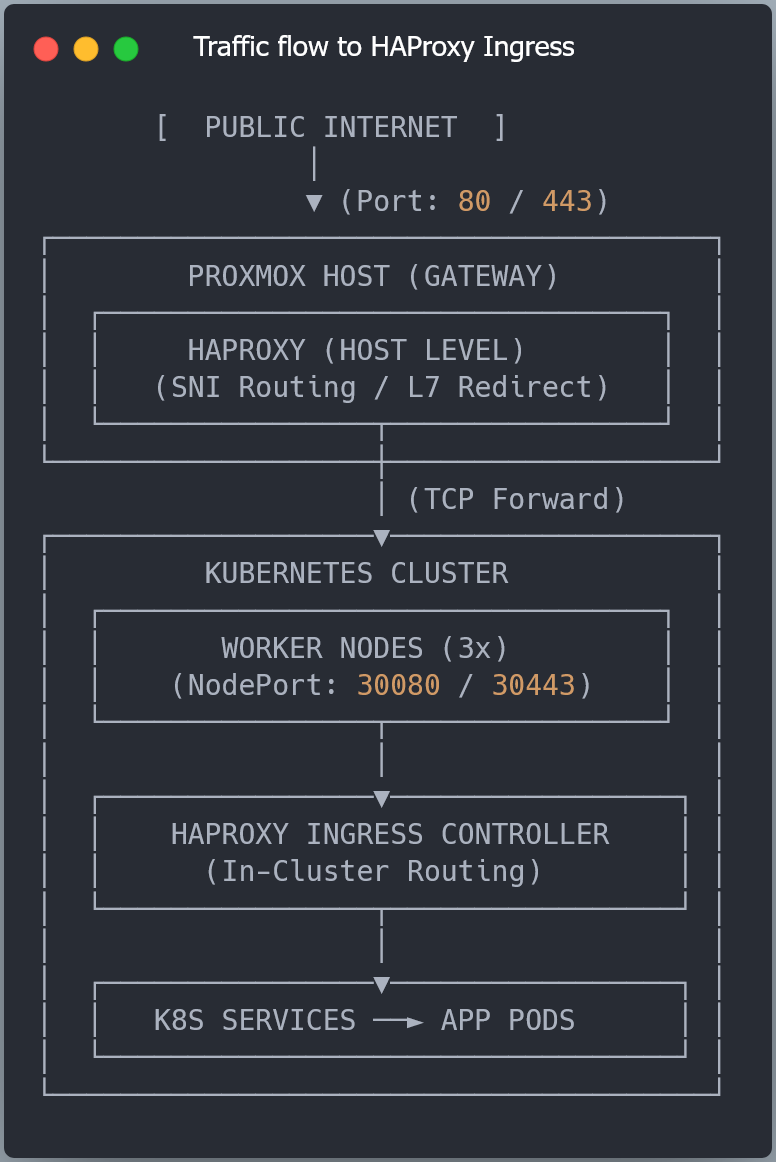
The Proxmox host gets traffic into the cluster, and from there, the ingress controller takes over and handles everything inside Kubernetes.
Install the ingress controller
First, add the Helm repository:
helm repo add haproxytech https://haproxytech.github.io/helm-charts
helm repo update
Then install the controller using the provided values file:
cd examples
helm install haproxy-ingress haproxytech/kubernetes-ingress \
  --namespace haproxy-controller \
  --create-namespace \
  -f examples/01-haproxy-ingress/values.yaml
This deploys the ingress controller as a DaemonSet, so each worker node runs its own HAProxy instance listening on the NodePort service.
Verify everything is running
Check the pods:
kubectl get pods -n haproxy-controller -o wideYou should see one ingress pod per worker node.
Then check the service:
kubectl get svc -n haproxy-controllerYou should see NodePorts 30080 and 30443. These are exactly the ports the Proxmox HAProxy forwards traffic to.
Configuration details
Let’s take a closer look at examples/01-haproxy-ingress/values.yaml:
controller:
  # Use DaemonSet to run one pod per node for distributed traffic processing
  kind: DaemonSet

  # Network service configuration
  service:
    type: NodePort
    # 'Local' preserves the client source IP and avoids extra hops between nodes
    externalTrafficPolicy: Local
    nodePorts:
      http: 30080
      https: 30443

  # HAProxy internal configuration (via ConfigMap)
  config:
    use-proxy-protocol: "false"
    # SSL redirect is handled by Proxmox HAProxy (not by HAProxy Ingress Controller)
    # HAProxy on dedicated server redirects HTTP to HTTPS, but allows /.well-known/acme-challenge/ to pass through
    # Disabling ssl-redirect here to prevent double redirect and allow HTTP-01 challenge to work
    ssl-redirect: "false"

  resources:
    limits:
      cpu: 500m
      memory: 512Mi
    requests:
      cpu: 100m
      memory: 128Mi

  # Enable built-in Prometheus metrics exporter
  metrics:
    enabled: true

# IngressClass resource configuration
# Use 'ingressClassName: haproxy' in your Ingress manifests
ingressClassResource:
  enabled: true
  name: haproxy
  default: false
DaemonSet deployment
The controller runs as a DaemonSet, so each worker node runs its own HAProxy instance. Traffic forwarded from the Proxmox host lands on a worker node and gets handled locally, without extra hops across the cluster.
NodePort service (30080 / 30443)
The ingress controller is exposed via:
30080→ HTTP30443→ HTTPS
These match the ports configured in the Proxmox HAProxy backends. External traffic reaches the Proxmox host first, then gets forwarded to one of these ports on a worker node.
externalTrafficPolicy: Local
This keeps traffic on the node where it arrives and avoids unnecessary forwarding between nodes.
PROXY protocol disabled
PROXY protocol is disabled to keep HTTP-01 certificate validation reliable. Enabling it globally breaks ACME HTTP validation. If real client IP preservation is needed later, switching to DNS-01 challenges allows PROXY protocol to be enabled safely.
SSL redirect handled at the edge
HTTP → HTTPS redirect is handled by the Proxmox HAProxy. The ingress controller only routes traffic inside the cluster, avoiding redirect conflicts and keeping ACME validation working.
IngressClass
The deployment registers an IngressClass named haproxy. Use ingressClassName: haproxy in your Ingress manifests to route traffic through this controller.
Configure Let’s Encrypt SSL certificates
With the ingress controller in place, the cluster is ready to issue and manage TLS certificates automatically using cert-manager and Let’s Encrypt.
cert-manager runs inside Kubernetes and handles the full certificate lifecycle — requesting, storing, and renewing certificates as needed. It integrates directly with Ingress resources, so certificates are issued automatically when new domains appear.
Install cert-manager
Add the Helm repository:
helm repo add jetstack https://charts.jetstack.io
helm repo update
Install cert-manager:
helm install cert-manager jetstack/cert-manager \
  --namespace cert-manager \
  --create-namespace \
  --set crds.enabled=true
Verifying cert-manager and ClusterIssuer Setup
Wait until all pods are running:
kubectl get pods -n cert-managerCreate the Let’s Encrypt ClusterIssuer
Copy the example file and update your email:
cd examples
cp 02-letsencrypt/cluster-issuer.yaml.example 02-letsencrypt/cluster-issuer.yaml
vi 02-letsencrypt/cluster-issuer.yaml
Then apply it:
kubectl apply -f 02-letsencrypt/cluster-issuer.yamlVerify:
kubectl get clusterissuerYou should see both:
letsencrypt-stagingletsencrypt-prod
The staging issuer is useful for testing, while the production issuer provides trusted certificates.
Automation: HTTP-01 Challenge Flow with HAProx
cert-manager uses the HTTP-01 challenge flow. When a certificate is requested, it temporarily creates an Ingress that exposes a validation endpoint:
http://example.com/.well-known/acme-challenge/<token>Your Proxmox HAProxy allows this path over HTTP and forwards it to the cluster, where cert-manager responds to the challenge. Once validation succeeds, the certificate is issued and stored as a Kubernetes Secret.
After that, the ingress controller automatically uses the certificate for TLS.
Configuring K8s Ingress for TLS Certificates
To enable TLS for a domain, reference the ClusterIssuer in your Ingress:
apiVersion: networking.k8s.io/v1
kind: Ingress
metadata:
  annotations:
    cert-manager.io/cluster-issuer: letsencrypt-staging
spec:
  ingressClassName: haproxy
  tls:
    - hosts:
        - example.com
      secretName: example-com-tls
cert-manager will:
request the certificate
store it in the Secret
and renew it automatically before expiration
Once everything is working, you can switch from letsencrypt-staging to letsencrypt-prod to get trusted certificates.
End-to-End Test: Deploying Podinfo with TLS
With HAProxy at the edge, the ingress controller running, and cert-manager issuing certificates, the last step is to deploy a simple application and verify that everything works end-to-end.
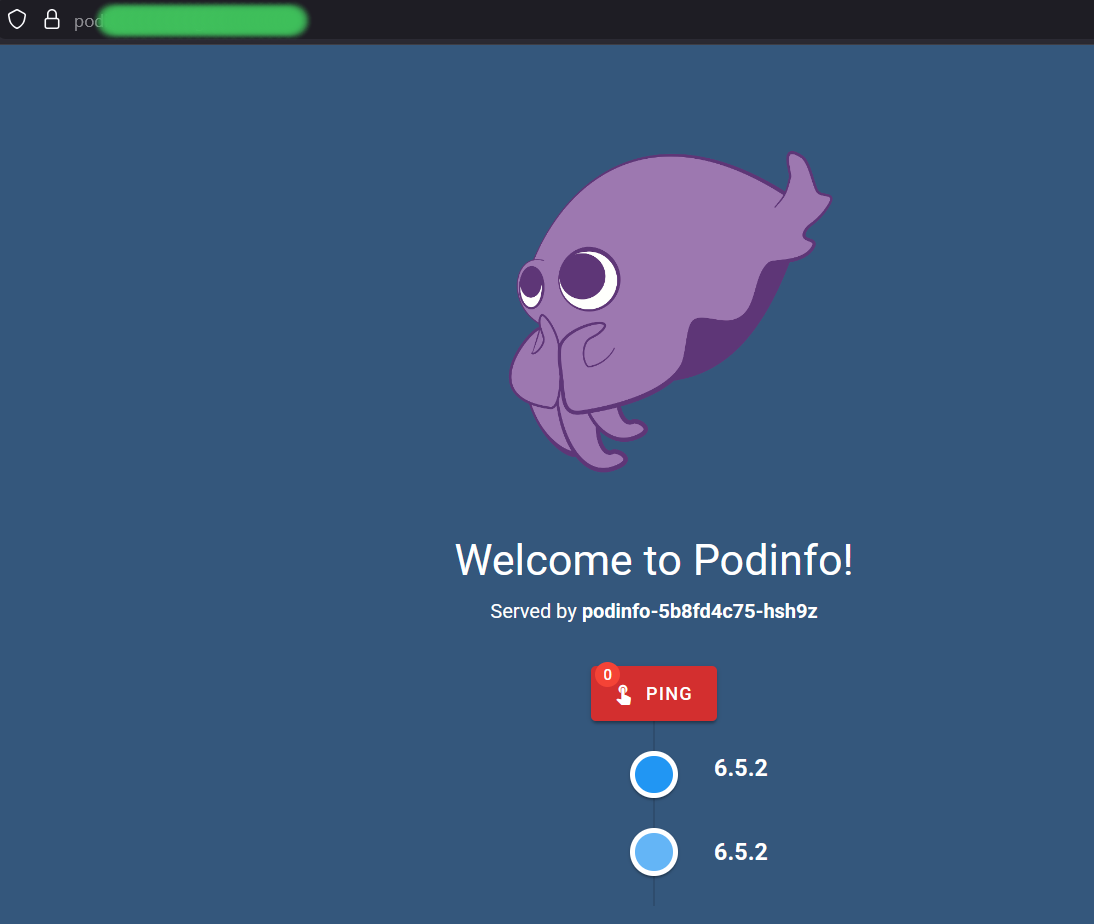
We’ll use Podinfo as a lightweight test service to verify the full ingress path — from the internet to a pod inside the cluster — and confirm that routing and TLS are working correctly.
Deploy the application
Apply the deployment and service:
kubectl apply -f examples/03-podinfo/deployment.yamlVerify that pods and service are running:
kubectl get pods -l app=podinfo
kubectl get svc -l app=podinfo
You should see the pods in Running state and a service exposing port 9898.
Create the Ingress resource
Copy the example Ingress manifest and update it with your domain:
cp examples/03-podinfo/ingress.yaml.example examples/03-podinfo/ingress.yaml
vi examples/03-podinfo/ingress.yaml
Set your domain and start with the staging issuer:
annotations:
  cert-manager.io/cluster-issuer: letsencrypt-staging
Apply the Ingress:
kubectl apply -f examples/03-podinfo/ingress.yamlThis triggers cert-manager to request a certificate and configure TLS automatically.
Verify certificate issuance
Certificate provisioning may take a minute or two. You can watch progress with:
kubectl get certificate podinfo-tls -wOnce ready, the certificate will be stored as a Secret and picked up automatically by the ingress controller.
At this point, TLS is fully active.
Test the full traffic path
Test HTTP:
curl -I http://your-domain.comIf everything is configured correctly, the request will pass through:
Internet → Proxmox HAProxy → Worker Node → Ingress Controller → Service → PodSwitch to production certificates
Once staging works, update the issuer:
annotations:
  cert-manager.io/cluster-issuer: letsencrypt-prod
Apply again:
kubectl apply -f examples/03-podinfo/ingress.yamlcert-manager will issue a trusted certificate and replace the staging one automatically.
At this point, the full ingress path is live — HAProxy handles external traffic, Kubernetes routes it internally, and cert-manager keeps certificates up to date.
What’s Next & How to Automate It
At this point, ingress is working, cert-manager is issuing TLS certificates automatically, and HAProxy is forwarding external traffic into the cluster.
Applications are reachable over HTTPS, and traffic flows from the internet to pods without any manual steps. Github repo is updated, just clone the repo, checkout part_8 and follow the README.md instructions.
➜ In the next article, we’ll introduce Argo CD and switch to a Git-based deployment workflow.
Instead of applying manifests manually, Argo CD will watch a Git repository and keep the cluster in sync automatically. This makes deployments easier to manage and removes the need to run kubectl apply from your workstation.